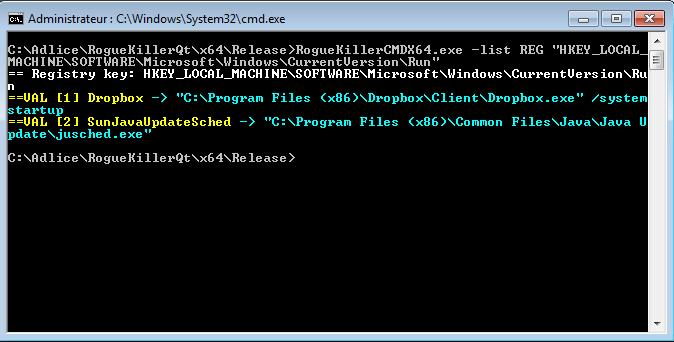
Lister les éléments d'une clé de registre (valeurs et sous-clés)
RogueKillerCMD.exe -list REG "{root}\{some_key}\{subkey}"
Exemple:
RogueKillerCMD.exe -list REG "HKEY_LOCAL_MACHINE\Software\Microsoft\Windows\CurrentVersion\Run"
Supprimer une clé de registre (récursif)
RogueKillerCMD.exe -kill REG "{root}\{some_key}\{subkey}"
Exemple:
RogueKillerCMD.exe -kill REG "HKEY_LOCAL_MACHINE\Software\Microsoft\Windows\CurrentVersion\Run\Malware"
Supprimer une clé de registre par index (base 1, récursif)
RogueKillerCMD.exe -kill REG "{root}\{some_key}\{subkey}:subkey:{1-based index}"
Exemple:
RogueKillerCMD.exe -kill REG "HKEY_LOCAL_MACHINE\Software\Microsoft\Windows\CurrentVersion\Run:subkey:1"
Supprimer une valeur de registre
RogueKillerCMD.exe -kill REG "{root}\{some_key}\{subkey}:{value}"
Exemple:
RogueKillerCMD.exe -kill REG "HKEY_LOCAL_MACHINE\Software\Microsoft\Windows\CurrentVersion\Run:the_malware"
Supprimer une valeur de registre par index (base 1)
RogueKillerCMD.exe -kill REG "{root}\{some_key}\{subkey}:value:{1-based index}"
Exemple:
RogueKillerCMD.exe -kill REG "HKEY_LOCAL_MACHINE\Software\Microsoft\Windows\CurrentVersion\Run:value:1"
Supprimer la valeur de registre par défaut (nom vide)
RogueKillerCMD.exe -kill REG "{root}\{some_key}\{subkey}:(default)"
Exemple:
RogueKillerCMD.exe -kill REG "HKEY_LOCAL_MACHINE\Software\Microsoft\Windows\CurrentVersion\Run:(default)"