
License Renewal
You have purchased a license with expiration date, and it has outdated or is about to.
You want to renew your license, this is how you should do (either one of the following):
Table of Contents
From account page
-
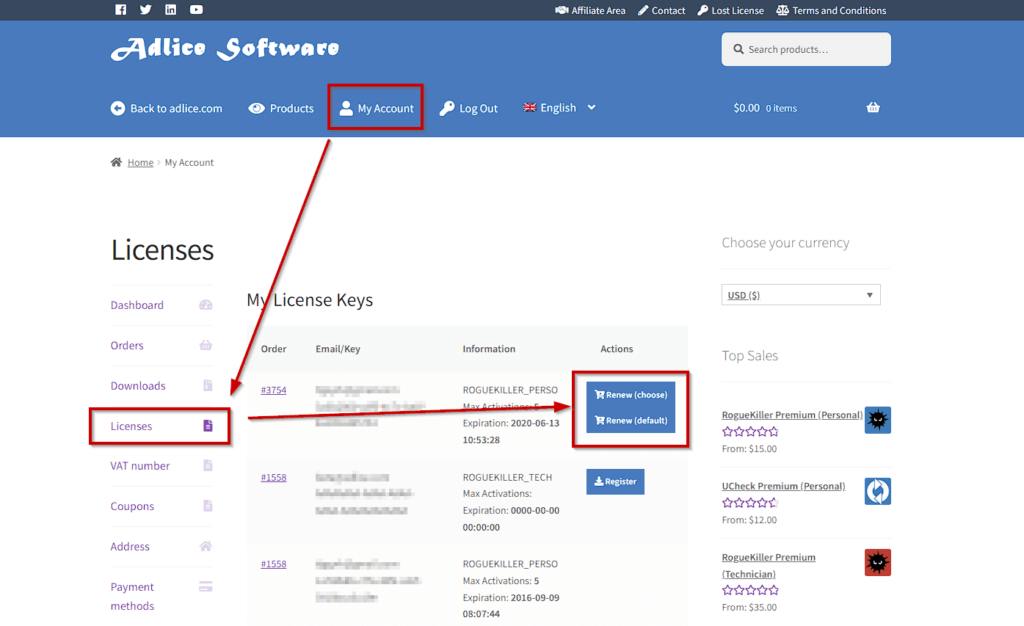
Go to you shop account, on this page (login first): https://shop.adlice.com/my-account/wc-software/
-
Choose the license you want to renew from the list, click on one of the following buttons:
-
“Renew (Choose)” takes you to the product page, with pre-filled license key to renew. Just select the period, the devices and click “Renew” to add item to the cart.
-
“Renew (Default) directly adds to the cart the same item (period / devices) that you purchased the first time. It’s a the quick renewal.
- A renewal item (including Discount, if applicable) is now in your cart. Proceed to checkout.
- Upon payment, the license will be extended automatically.
- There’s nothing else to do, the software will handle it.
Manually (you need to have your license info)
-
Go to our shop, on the product page.
-
Choose a renewal period, your license will be extended with the following calculation:
2a. If the license is NOT outdated, it will be extended by the period starting at the expiration date.
(Example: expires on Feb 1st 2020, we are Jan 15th 2020, buys 1 year => Feb, 1st 2021)
2b. If the license IS outdated, it will be extended by the period starting at purchase date.
(Example: expires on Feb 1st 2020, we are Feb 3rd 2020, buys 1 year => Feb, 3st 2021) -
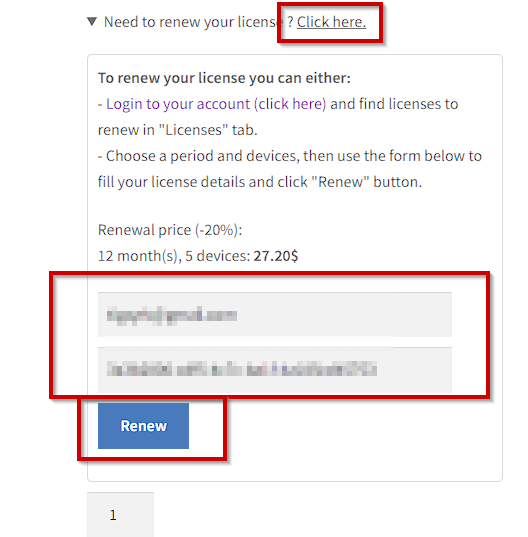
Fill in your licensing details (for the license you want to renew) in the “Is your license outdated” box. Click “Upgrade”.
-
A renewal item (including Discount, if applicable) is now in your cart. Proceed to checkout.
-
Upon payment, the license will be extended automatically.
-
There’s nothing else to do, the software will handle it.