
Configuración
Configuración en Bare Metal (opcional)
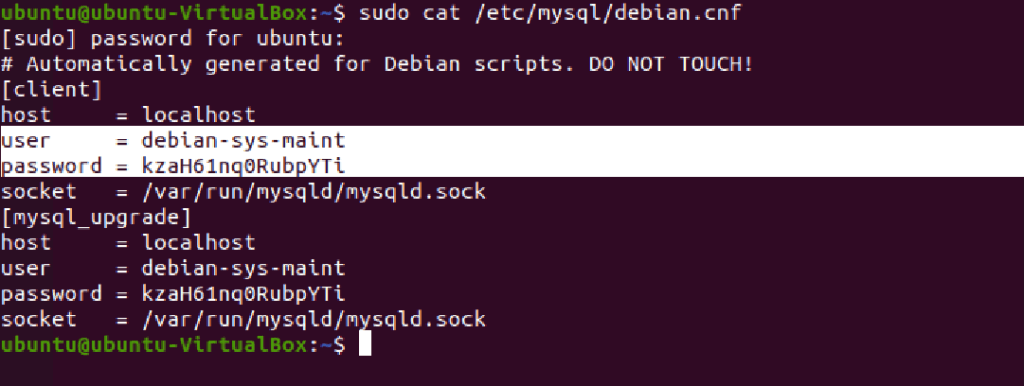
Localice sus credenciales de MySQL. Puede obtenerlas con el siguiente comando.
sudo cat /etc/mysql/debian.cnf
Configuración de Docker (opcional)
No hay que hacer nada específico, salvo lo que ya se hizo en los Pasos de instalación.
Simplemente prepare su usuario/contraseña de MYSQL y la ubicación de almacenamiento para los siguientes pasos.
Configuración común
Edite su archivo de configuración (en /your_root/src/config.php), como se explica a continuación.
A partir de los Pasos de instalación, rellene la siguiente información:
- El nombre de la base de datos en las secciones “db/storage” y “db/usercake”
- Las credenciales de la base de datos (ver arriba) en las secciones “db/storage” y “db/usercake”.
- El host de la base de datos en las secciones “db/storage” y “db/usercake”. NOTA: Para docker debe ser el nombre del contenedor de mysql (“db” en nuestra plantilla).
- La ruta de almacenamiento en la sección “urls/storagePath”
- La url pública en la sección “urls/baseUrl”. Ejemplo: “http://localhost” (localmente), “https://my.mrf.example.com/”
Luego, cambie el archivo de configuración según sus necesidades (ver más abajo)
Módulos
La mayoría de los módulos no están documentados, no se recomienda cambiar su configuración. Solo unos pocos pueden ajustarse:
Cuckoo
- Habilite el módulo con la sección “cuckoo/enabled” = True
- Ponga la url de la API de cuckoo en la sección “cuckoo/api_base_url” (ver documentación de Cuckoo)
- Ponga la url base WEB de cuckoo en la sección “cuckoo/web_base_url”
- Cambie never upload = True/False en la sección “cuckoo/never_upload”. Cuando está habilitado, ninguna muestra puede subirse al sitio web de terceros, incluso si es desconocida.
- No olvide volver a ejecutar el script de instalación si es necesario tras cambiar esto
VirusTotal
- Habilite el módulo con la sección “virustotal/enabled” = True
- Ponga su clave de API de VirusTotal en la sección “virustotal/key”
- Cambie never upload = True/False en la sección “virustotal/never_upload”. Cuando está habilitado, ninguna muestra puede subirse al sitio web de terceros, incluso si es desconocida.
- Cambie automatic comment = True/False en la sección “virustotal/comment_uploaded/enabled”. Cuando está habilitado, todas las muestras subidas (previamente desconocidas) se comentarán en VirusTotal con el texto que defina.
- Cambie el contenido del comentario automático en la sección “virustotal/comment_uploaded/comment” (opcional).
- No olvide volver a ejecutar el script de instalación si es necesario tras cambiar esto
YaraEditor (YED)
- Habilite el módulo con la sección “yed/enabled” = True
- Ponga la url de la API de YaraEditor en la sección “yed/url” (ver documentación de YaraEditor)
- Ponga su clave de API de YaraEditor en la sección “yed/key”
- Cambie never upload = True/False en la sección “yed/never_upload”. Cuando está habilitado, ninguna muestra puede subirse al sitio web de terceros, incluso si es desconocida.
- No olvide volver a ejecutar el script de instalación si es necesario tras cambiar esto
Hybrid Analysis
- Habilite el módulo con la sección “hybridanalysis/enabled” = True
- Ponga la url de la API de YaraEditor en la sección “hybridanalysis/url” (ver documentación de Hybrid Analysis)
- Ponga su clave de API de YaraEditor en la sección “hybridanalysis/key”
- Cambie never upload = True/False en la sección “hybridanalysis/never_upload”. Cuando está habilitado, ninguna muestra puede subirse al sitio web de terceros, incluso si es desconocida.
- No olvide volver a ejecutar el script de instalación si es necesario tras cambiar esto
Any.RUN (¡Nuevo V7.0!)
- Habilite el módulo con la sección “anyrun/enabled” = True
- Ponga su clave de API de Any.Run en la sección “anyrun/key” (ver documentación de Any.RUN Analysis)
- Cambie never upload = True/False en la sección “anyrun/never_upload”. Cuando está habilitado, ninguna muestra puede subirse al sitio web de terceros, incluso si es desconocida.
- No olvide volver a ejecutar el script de instalación si es necesario tras cambiar esto
Encontrará a continuación una plantilla de archivo de configuración con opciones preconfiguradas.
No dude en usarla como punto de partida.
mostrar plantilla de configuración
<?php

/*
    The important thing to realize is that the config file should be included in every
    page of your project, or at least any page you want access to these settings.
    This allows you to confidently use these settings throughout a project because
    if something changes such as your database credentials, or a path to a specific resource,
    you'll only need to update it here.
*/

$config = array(
    "version" => "7.0",
    "db" => array(
        "storage" => array(
            "dbname" => "mrf",      			// {{CHANGE THIS}} database name for samples storage
            "username" => "your_mysql_user",   		// {{CHANGE THIS}} database user for samples storage
            "password" => "your_mysql_password",        // {{CHANGE THIS}} database user password for samples storage
            "host" => "localhost"   		        // {{CHANGE THIS}} database host for samples storage
        ),
        "usercake" => array(
            "dbname" => "mrf",      			// {{CHANGE THIS}} database name for users storage
            "username" => "your_mysql_user",   		// {{CHANGE THIS}} database user for users storage
            "password" => "your_mysql_password",       	// {{CHANGE THIS}} database user password for users storage
            "host" => "localhost"   		        // {{CHANGE THIS}} database host for users storage
        )
    ),
	"leftnav" => array(
		array(
            "name" => "Dashboard",
            "link" => "/index.php",
            "icon" => "fa fa-dashboard",
        ),
		array(
            "name" => "Upload",
            "link" => "/upload.php",
            "icon" => "fa fa-upload",
        ),
        array(
            "name" => "Search",
            "link" => "/search.php",
            "icon" => "fa fa-search",
        ),
		array(
    		"name" => "Discussions",
    		"icon" => "fa fa-comments",
    		"link" => array(
    		   array(
		            "name" => "Create",
		            "link" => "/add_discussion.php",
		            "icon" => "fa fa-plus",
		       ),
		       array(
		            "name" => "Browse",
		            "link" => "/discussions.php",
		            "icon" => "fa fa-search",
		       ),
		    )
    	),
		array(
    		"name" => "Feeds",
    		"icon" => "fa fa-rss",
    		"link" => array(
		       array(
		            "name" => "Urls Tracker",
		            "link" => "/urltracker.php",
		            "icon" => "fa fa-android",
		        ),
		    )
    	),
		array(
            "name" => "Cuckoo",
            "link" => "/cuckoo.php",
            "icon" => "fa fa-fire",
			"access" => "admin",
        ),
    ),
    "user_settings" => array(
        "email_notifications" => array(
            "display" => "Email Notifications",
            "settings" => array(
                "new_comment_on_discussion" => array(
                    "name" => "email_notification_on_discussion",
                    "display" => "Email notification on discussion activity",
                    "default" => False
                ),
                "new_comment_on_sample" => array(
                    "name" => "email_notification_on_sample",
                    "display" => "Email notification on sample comment",
                    "default" => False
                )
            )
        ),
        "third_party" => array(
            "display" => "VirusTotal per user Settings",
            "settings" => array(
                "user_virustotal_key" => array(
                    "name" => "user_virustotal_key",
                    "display" => "My VirusTotal API key (if empty, global is used)",
                    "default" => ""
                )
            )
        )
    ),
    "urls" => array(
        "baseUrl" => "https://domain.tld/",             // {{CHANGE THIS}} Base url of your website, TRAILING SLASH NEEDED
        "storagePath" => "/data/mrf/storage/",          // {{CHANGE THIS}} Samples storage full path (on disk), TRAILING SLASH NEEDED
        "storageUrl"  => "https://domain.tld/storage/"  // {{CHANGE THIS}} (Optional, only for direct samples access) Samples public url, TRAILING SLASH NEEDED
    ),
    "ui" => array(
        "template" => "ampleadmin",
        "colors" => "blue-dark",
        "is_dark" => True,
        "files_per_page" => 40,
        "hex_max_length" => 65536,
    ),
    "modules" => array(
        "localstorage" => array(
            "enabled" => True,
            "class" => "LocalStorage",
            "priority" => 10,
            "cron" => True,
        ),
        "mime" => array(
            "enabled" => True,
            "class" => "Mime",
            "priority" => 9,
            "cron" => True,
        ),
        "pedata" => array(
            "enabled" => True,
            "class" => "PEData",
            "priority" => 10,
            "cron" => True,
        ),
        "officedata" => array(
            "enabled" => True,
            "class" => "OfficeData",
            "priority" => 10,
            "cron" => True,
        ),
        "pdfdata" => array(
            "enabled" => True,
            "class" => "PDFData",
            "priority" => 10,
            "cron" => True,
        ),
        "ssdeep" => array(
            "enabled" => True,
            "class" => "SSDEEP",
            "priority" => 10,
            "cron" => True,
        ),
        "trid" => array(
            "enabled" => True,
            "class" => "TrID",
            "priority" => 10,
            "cron" => True,
        ),
        "bin2img" => array(
            "enabled" => True,
            "class" => "Bin2Img",
            "priority" => 10,
            "cron" => True,
        ),
        "cuckoo" => array(
            "enabled" => False,										// {{CHANGE THIS}} Optional, if you enable Cuckoo module, set True
            "class" => "Cuckoo",
            "priority" => 10,
            "api_base_url" => 'http://cuckoo.me:8080/',             // {{CHANGE THIS}} Cuckoo API url, TRAILING SLASH NEEDED: Used to communicate with the Cuckoo machine
            "web_base_url" => 'http://cuckoo.me:80/',               // {{CHANGE THIS}} Cuckoo web url, TRAILING SLASH NEEDED: Used to open reports
            "scan" => array(                                        // Cuckoo parameters, not supported yet
                    //"package" => "",    // uncomment to use
                    //"timeout" => "",    // uncomment to use
                    //"priority" => 3,    // 1 to 3, uncomment to use
                    //"options" => "",    // uncomment to use
                    //"machine" => "",    // uncomment to use
                    //"platform" => "",   // uncomment to use
                    //"tags" => "mrf",       // uncomment to use
                    //"custom" => "",     // uncomment to use
                    //"owner" => "",      // uncomment to use
                    //"memory" => False   // uncomment to use
            ),
            "scan_optional" => array(
                //"options" => [ "option1", "option2" ],    // uncomment to use, define options that can be sent to Cuckoo (a checkbox is shown on submission)
            ),
            "cron" => True,
            "score" => False,
        ),
        "virustotal" => array(
            "enabled" => False,					// {{CHANGE THIS}} Optional, if you enable VirusTotal module, set True
            "class" => "VirusTotal",
            "priority" => 10,
            "key" => 'your_api_key',            // {{CHANGE THIS}} Replace with your VirusTotal API key
            "automatic_upload" => True,         // {{CHANGE THIS}} True/False, whether you want to automatically upload unknown samples on submission.
                                                // {{CHANGE THIS}} If False, only a check is done, and manual upload is possible later.
            "comment_uploaded" => array(
                "enabled" => True,  // If true, files uploaded (new analysis) will be commented upon completion
                "comment" => "Sample received on MRF honeypot system, adlice.com"
            ),
            "vendors_priority" => array(
                "Microsoft",
                "Kaspersky",
                "BitDefender",
                "Malwarebytes"
            ),
            "cron" => True,
        ),
        "yed" => array(
            "enabled" => False,						// {{CHANGE THIS}} Optional, if you enable YaraEditor module, set True
            "class" => "Yed",
            "priority" => 10,
            "url" => 'https://yed.server.com/',		// {{CHANGE THIS}} Replace with your YaraEditorWeb server API url
            'key' => 'your_api_key',				// {{CHANGE THIS}} Replace with your YaraEditorWeb server API key
			"automatic_upload" => False,			// {{CHANGE THIS}} True/False, whether you want to automatically scan samples on submission.
            "cron" => True,
        ),

	    "hybridanalysis" => array(
	        "enabled" => False,								// {{CHANGE THIS}} Optional, if you enable Hybrid Analysis module, set True
	        "class" => "Hybrid",
	        "priority" => 10,
	        "url" => 'https://www.hybrid-analysis.com/',	// {{CHANGE THIS}} Optional, Replace with your Hybrid Analysis server API url (if different)
	        'key' => 'your_api_key',						// {{CHANGE THIS}} Replace with your Hybrid Analysis API key
	        "automatic_upload" => True,						// {{CHANGE THIS}} True/False, whether you want to automatically upload samples on submission.
	        "cron" => True,
	    ),
        "urltracker" => array(
            "enabled" => True,
            "class" => "UrlTracker",
            "priority" => 10,
            "cron" => True,
        ),
    ),
     // Warning: Cron isn't enabled by this framework.
     // Setting enabled to true means YOU have registered /src/cron.php in the cron table
     // and that VirusTotal/Cuckoo refreshes will be performed by it.
     // This tells the uploader NOT to perform VirusTotal/Cuckoo refreshes when getting the samples to display.
     // This drastically improves performance when you have many scans pending on the current page.
    "cron" => array(
        "enabled" => True,
        "remove_old_samples" => array(
            "enabled" => True,
            "older_than_days_count" => 30
        )
    ),
    // Paths can be different on several machines, and have either redirections or restrictions.
    // Default values are usually good, but can be tweaked for specific cases.
    "path" => array (
        "tmp" => "/tmp"  // Temporary folder location, this must be in your authorized write locations
    ),
	"options" => array(
		// When public mode is enabled, APIs needed for sample page
		// Are NOT checked for valid API Key.
		// Instead, only a REFERER/ORIGIN basic check is performed.
		// This allows the sample page to be browsed without any account
		"public_mode" => False
	),
);

$GLOBALS["config"] = $config;

function IsModuleEnabled($module) {
    return isset($GLOBALS["config"]["modules"][$module]) && $GLOBALS["config"]["modules"][$module]["enabled"];
}

/*
    I will usually place the following in a bootstrap file or some type of environment
    setup file (code that is run at the start of every page request), but they work
    just as well in your config file if it's in php (some alternatives to php are xml or ini files).
*/

/*
    Creating constants for heavily used paths makes things a lot easier.
    ex. require_once(LIBRARY_PATH . "Paginator.php")
*/
//defined("LIBRARY_PATH")
//    or define("LIBRARY_PATH", realpath(dirname(__FILE__) . '/library'));

//defined("TEMPLATES_PATH")
//    or define("TEMPLATES_PATH", realpath(dirname(__FILE__) . '/templates'));

/*
    Error reporting.
*/
ini_set("error_reporting", "true");
error_reporting(E_ALL|E_STRCT);

?>
ocultar plantilla de configuración