Updates
WARNING: Starting with v2.1, some of the parameters have changed. Please double check carefully your existing scripts.
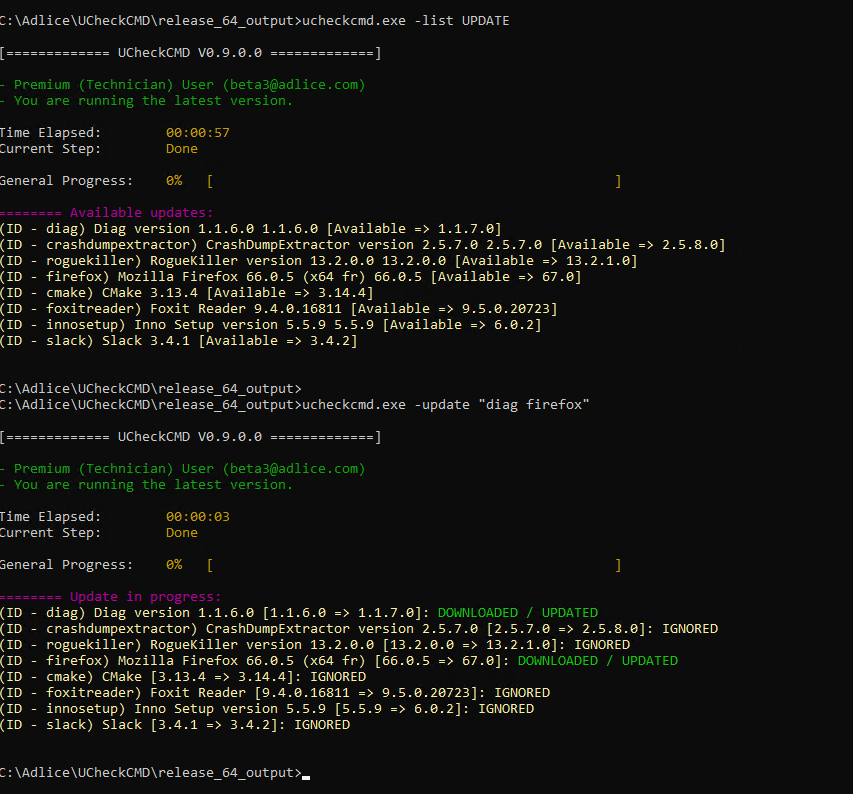
List Software Updates
UCheckCMD.exe -list UPDATE
Update software
UCheckCMD.exe -update "soft1 soft2 ... softn"
UCheckCMD.exe -update ALL
UCheckCMD.exe -update ALL -ignore "soft1 soft2 ... softn"
UCheckCMD.exe -update "soft1" -ignore-pup -no-interact
The soft1, soft2 are software ID as displayed when listing software available or when listing updates. Alternatively, use “ALL” to update all software. “-ignore-pup” flag can be used to force installation of software known to have optional offers (not recommended). The flag -ignore can be used when updating ALL to ignore certains software during update.
Available parameters
-
-reportpath {report_path}: Specify a file path where the report will be also copied
-
-reportformat {json|txt}: Specify a file format for the report copy
-
-accept-eula: Accept terms and conditions without prompt
-
-no-interact: No user interaction, equivalent to -accept-eula
-
-debuglog {path}: Log scan activity to a file
-
-portable-config {path_to_portable_config_file}: Specify a portable config file generated by the Technician
-
-portable-license {license_email} {license_key}: Technician only, uses the given license in memory only (portable mode)
-
-portable-workdir {path}: Directory to use for scanner files storage. Leaves no traces outside of this.
Examples
UCheckCMD.exe -list UPDATE
UCheckCMD.exe -list UPDATE -reportpath C:\report.txt -reportformat txt
UCheckCMD.exe -list UPDATE -portable-config C:\my_config.ini
UCheckCMD.exe -list UPDATE -portable-workdir "C:\ucheck_workdir"
UCheckCMD.exe -update "firefox ccleaner opera"
UCheckCMD.exe -update ALL
UCheckCMD.exe -update ALL -ignore "firefox ccleaner" -debuglog "C:\debug.log"
UCheckCMD.exe -update "foxitreader" -ignore-pup -no-interact