
Monitors
**What is a monitor? **
For CDE, a monitor is a unique software configuration used to retrieve and manage crash dumps.
Let’s say we have an application App with this information:
- Sources are located in C:/SourceFolder
- Symbols are located in C:/Symbols
- Binaries are located in C:/Binaries
- Crash dumps are downloaded to C:/Dumps
In order to manage crash dumps for that software, we will then add a monitor with the previous information in the “Monitors” tab.
Here’s an example with a live RogueKiller example:
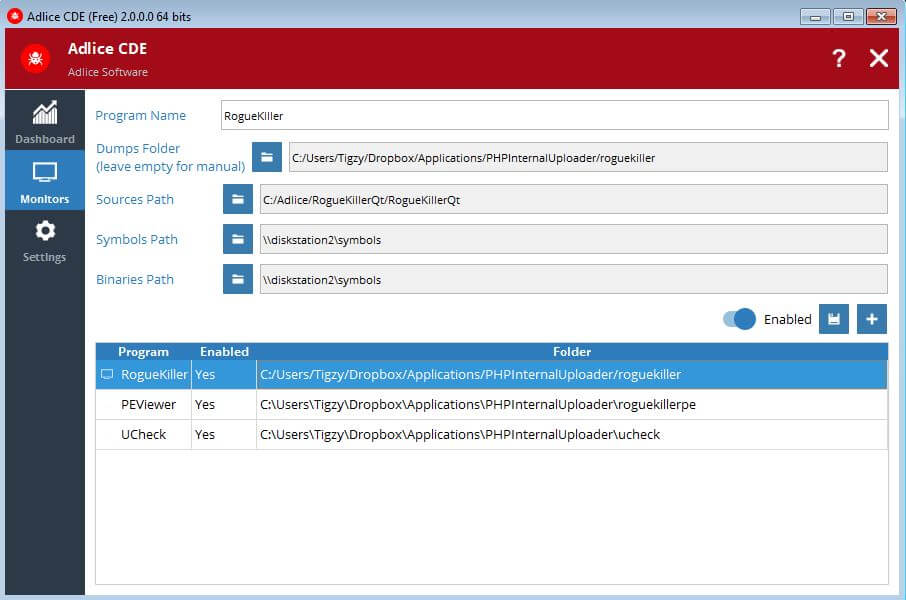
As soon as the monitor is added (and is enabled), you have 2 options:
- If “Dumps folder” was given an existing folder path, the internal search worker will look for new dumps into it, and add them. As soon as a new file is created into this folder, it will be picked by the searcher, and added if a valid dump file. The searcher runs until the program is exited.
- If “Dumps folder” was left empty, the searcher thread will not try to add dumps, and dumps can only be added manually.
A monitor can be edited, or removed.