
Choose your plan
Free
- Scan & Remove Malware
- AntiRootkit
- Personal Use Only
- Forum support
Premium
- Scan & Remove Malware
- AntiRootkit
- Malware Protection
- Ransomware Protection
- Clipboard Protection
- Enterprise Use Allowed
- Email support
Technician
- All Premium Features
- Portable Config & License
- Unlimited machines
- Scriptable software
- Email support
FAQ
What License Version do I need?
I'm an individual protecting my home PCs — which license?
I'm a company installing it on our computers — which license?
I work in an IT department for punctual remediation — which license?
I run a repair shop / help users remotely — which license?
Overview
Free Virus Cleaner
Finds known and unknown malware of all kinds — viruses, ransomware, trojans and more — powered by AI heuristics and a cloud signatures engine.
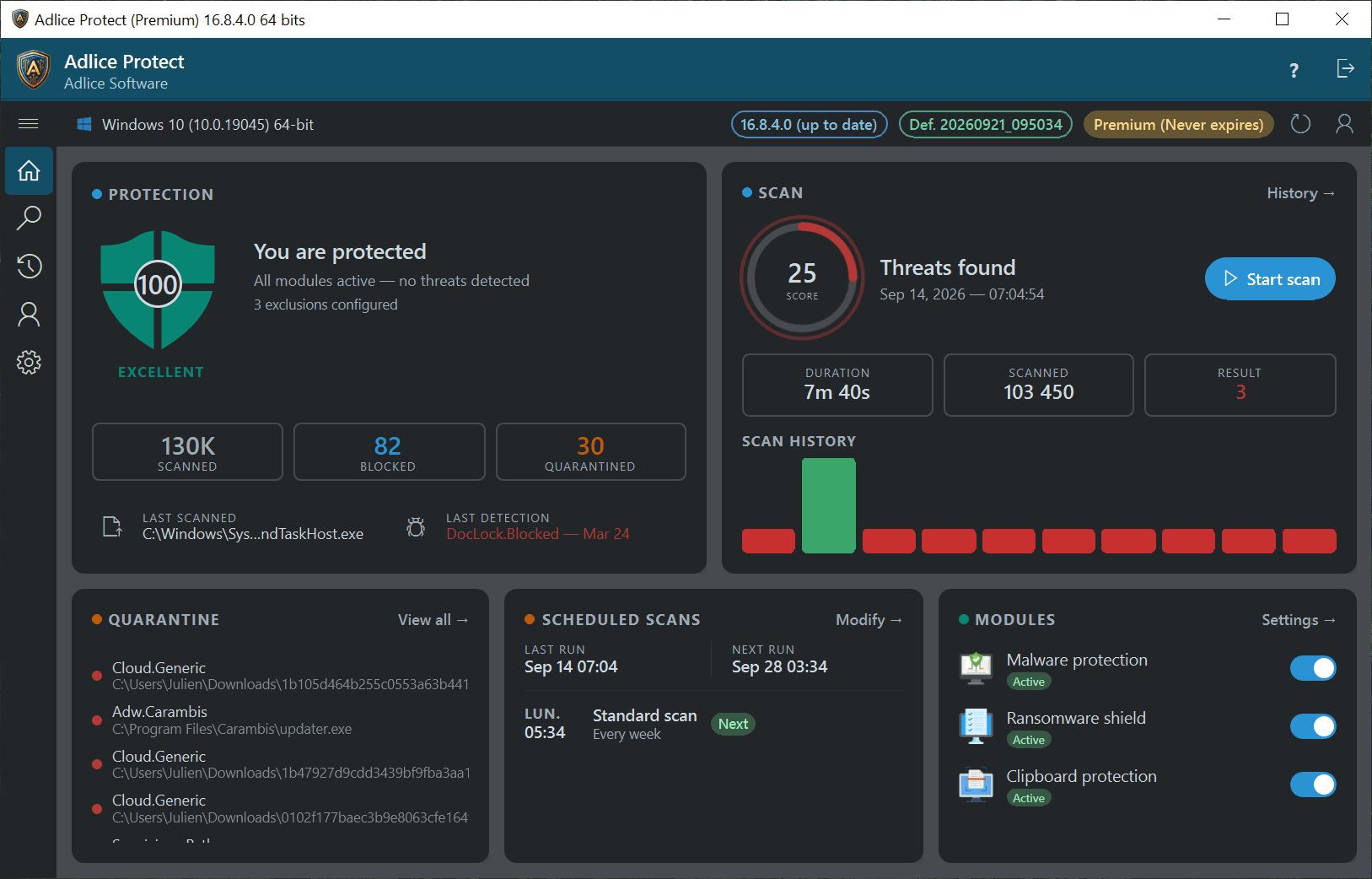
- See your protection at a glance.
- A single score tells you whether every module is active and whether anything needs attention.
- Scan on your schedule.
- Run a scan on demand or leave it to a weekly schedule, with the full history kept.
- Nothing is deleted behind your back.
- Detections go to quarantine, where you can review them and restore anything you want back.
Features
Everything you need, nothing you don't
Malware Protection
Real-time protection that stops infected programs before they execute, so malicious software never gets to set up.
- Removes known and unknown threats.
- Detects and cleans viruses, trojans and spyware, backed by AI heuristics and cloud signatures.
- Finds what hides deepest.
- Digs out rootkits that tamper with Windows, catching threats normal antivirus scans miss.
- Powerful, yet featherlight.
- Real-time scanning with no slowdown — game or work during a scan, and it saves battery too.
Anti Ransomware
Protect your documents against corruption and theft — don't be the next victim of a thousand-dollar ransom.
- Stops encryption in its tracks.
- Blocks ransomware before it locks your files, protecting documents, photos and personal data.
- Shields your secrets.
- Guards the clipboard from prying malware, keeping passwords, card numbers and wallets safe.
- Your data stays yours.
- Protected folders keep the files that matter out of reach of anything trying to rewrite them.
Password Protection
An innovative clipboard protection: the engine stops suspicious programs reading — or writing — sensitive data from your clipboard.
- Card numbers stay private.
- A copied card number cannot be lifted from the clipboard by anything watching in the background.
- Wallets stay yours.
- Crypto addresses are a favourite target for clipboard swapping — pasted funds reach the address you actually copied.
- Passwords are not readable.
- Copy from a password manager without a suspicious process being able to read what you pasted.
Maximum Performance
Built so your computer stays usable — play a game during a scan and keep full power without interruption.
- Barely registers.
- Real-time scanning that leaves your CPU and memory free for whatever you are actually doing.
- Game during a scan.
- No stutter, no pause, no waiting for the scan to finish before your machine is yours again.
- Kind to your battery.
- Scanning is scheduled and throttled so a laptop does not pay for protection in runtime.
And more
More ways it protects you
Protect your Data
Ransomware is one of the biggest online threats today. It doesn't just destroy your precious documents and family pictures — it also threatens to leak them online. Protect yourself and your relatives: enable data-leak prevention to keep your secrets safe, and turn your documents folder into an armored safe.
Protect your Privacy
Everybody struggles with passwords. Despite the surge of password managers, they remain a big concern — and it gets worse when malware steals the password of your favorite social network and reuses it on your bank account (many people use the same password everywhere). We've got you covered: Adlice Protect (RogueKiller) restricts access to the clipboard to protect your sensitive data — credit card numbers, a cryptocurrency wallet, and of course your passwords.
Malware Removal as a Service
Are you a computer-rescue technician, or an IT agent in a company? The “Technician” license lets you remove threats everywhere you're needed, with no limitations. Build your rescue package on a USB stick or a network share, put on your cape, and go save the data.
See it in action
What users say
Trusted by people who clean real machines
One of the best free virus cleaner
“I've been playing hide and seek with a virus on my laptop for weeks. Have tried more anti malware software programs than I can remember. I tried adwcleaner, malwarebytes and eset. I see the bogus files and if I remove 1, 2 more appear. Saw RogueKiller Anti-Malware and expected more disappointment. Instead it cleaned my system! Others Anti-malware said my system was clean. Adlice Protect (RogueKiller) easily did what the others missed. Awesome!”
“Purchased a Lifetime license, NO REGRETS. A must-have piece of software indeed; I've been recommending it to my close friends and relatives since then. So far it's working wonderfully with the latest version of Windows 11, and it worked fine around Windows 10 as well. It cleaned up a bunch of stuff that other pieces of software couldn't. When I first tried the free edition scanner, I knew that I had to get myself a licence for the real-time protection. As a networking engineer, despite the fact that I use Linux far more than Windows, I can totally vouch for this amazing tool for every Windows user and tech.”
“5 stars. Superior detection and minimal impact on system resources. I have used the free version to remove malware for years but I paid for premium last year. I am happily renewing when it expires. I am not renewing my main security though, as it detected 0 threats all year but RogueKiller has found 8 and successfully removed them all. If anyone has any doubts about the premium version, I would recommend this to anyone. It is the real deal for an incredible price, and Adlice is a top notch company with top notch support.”
“RogueKiller is a great little antimalware utility. I say little because it's so light on usage of system resources. Been using it for years. Plays nice with Windows Defender and all other security applications on my machines. Provides a 2nd resident real-time scanner to achieve the defense in-depth / layered security required to improve one's security posture in today's world of the ransomwared internet. Finds things that other products don't. Did I mention light? It's also light on your wallet, an all-around win win.”
“I used the free version for years and decided to purchase Adlice Protect Premium on the 1-year, 3-devices plan because the free version was so great, and now I get updates from within the app rather than having to manually download the update files and install them. Adlice Protect has found and removed many malware and potentially unwanted apps over the years, with the option to keep them if I want to, and Premium also guards my computer actively where the free version only works when you run it. I trust Adlice for excellence and highly recommend it.”
“I do not know if anyone else has noticed: RogueKiller doesn't have the smooth click experience I have seen in most applications. The update button on Premium, for example — when you click it you don't get the feeling the click worked, so you may end up clicking twice. Launching the app from the tray icon takes a second to appear. On the protection side the app works and it is recommendable, but the overall smoothness is lacking.”
Get it now
Download Adlice Protect
Latest version · v16.9
- OS:
- From Windows 7 SP1 to Windows 11
- Arch:
- 32-bit, 64-bit & ARM64
By downloading, you accept the EULA.