
Features
Everything you need, nothing you don't
Monitor anything
Start monitoring on various items: analyze a process, pick a file, or type your own command line — as long as it's valid, a monitored process is attached or created. A real-time process list makes attaching easy, and everything the process does is logged and displayed.
- Attach or launch.
- Pick a running process from the live list, choose a file, or type your own command line.
- Every action captured.
- Process, file, registry and network activity is recorded the moment it happens, as it happens.
- Sorted as it arrives.
- Each action is classified while the run is still going, so suspicious behaviour surfaces immediately rather than at the end.
Monitor everything
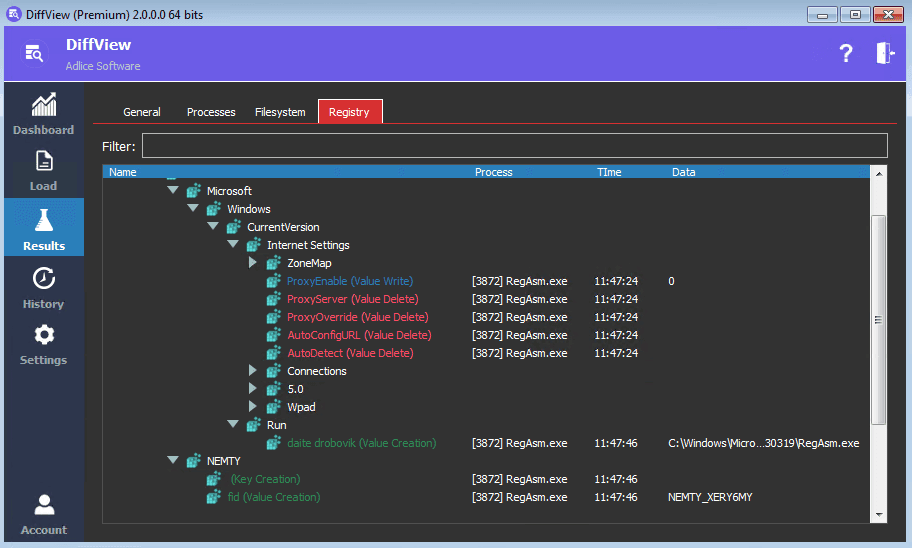
Choose what to collect — process manipulation, filesystem modifications or registry activity. All events are displayed in clear tree/table views, so you understand exactly what the monitored process is doing.
- Choose what to collect.
- Process manipulation, filesystem modifications, registry activity — or all three at once.
- Read as a hierarchy.
- Events nest under the process that caused them, so cause and effect stay together.
- Writes stand out.
- Changes are distinguished from reads, because what a program altered is what you came to see.
Analysis Score & Report
During collection, the analysis engine performs filtering and classification, producing indicators and a malicious score. On completion, a full report is generated and archived for later sharing. Happy sandboxing!
- A malicious score.
- The analysis engine filters and classifies what it collected, ending in a score rather than a raw log.
- Indicators, not just a number.
- Each behaviour that pushed the score is listed, so you can judge the verdict yourself.
- Archived for later.
- A full report is generated and kept when the run completes, ready to share or revisit.
What users say
Trusted by people who clean real machines
A very good portable sandbox
“I've analyzed malware for 15 years. Behavioral analysis usually means online sandboxes like Cuckoo or ANY.RUN — slow, and you must share the sample. I tried DiffView with the promise of everything localized on a test machine I own. It runs fast, is very easy to deploy (just drop a file), and the indicators and score are neat. I use it mostly on preliminary runs to find a sample's weak points. I do recommend.”
Get it now
Download DiffView
Latest version · v3.4
- OS:
- From Windows 7 SP1 to Windows 11
- Arch:
- 32-bit, 64-bit & ARM64
By downloading, you accept the EULA.